


For most homes, the Schlage Encode is the pick: a keypad deadbolt you can lock from anywhere. If you rent or want to keep your keys, the August retrofit lock fits over your current deadbolt instead.
A smart lock lets you check from your phone whether you locked up. It also lets the dog walker in without a hidden key. If you only want keyless entry, a plain keypad deadbolt with no app costs less and has nothing to hack; two are below.
 Best overallSchlage Encode Smart Wi-Fi DeadboltCheck price
 Best for Apple HomeULTRALOQ Bolt SE (Matter)Check price
 Best for rentersAugust Smart Lock Pro + ConnectCheck price
 Best keypad, no appSchlage Electronic Keypad DeadboltCheck price
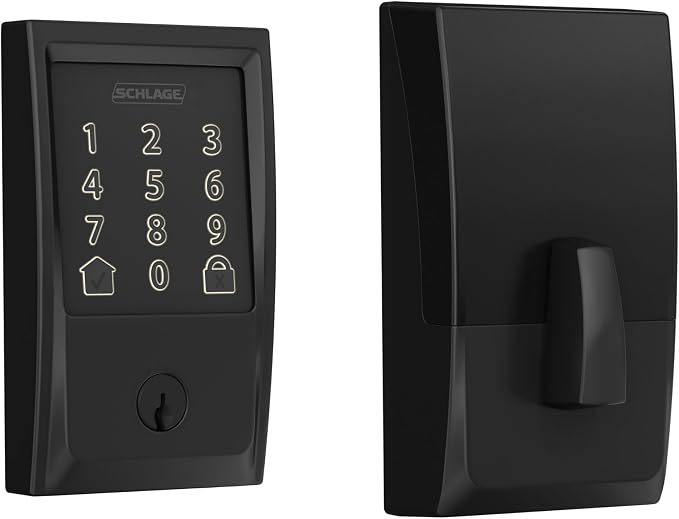
Schlage Encode Smart Wi-Fi Deadbolt
For: replacing your deadbolt with a sturdy smart lock, no hub needed
- ConnectsBuilt-in Wi-Fi
- CodesUp to 100
- FitsDoors 1-3/8 to 1-3/4 in.; 2-3/8 or 2-3/4 in. backset
The Encode replaces your deadbolt with a touchscreen keypad. It connects straight to Wi-Fi, so you can lock it from anywhere.
It holds up to 100 codes and keeps a history of who came and went. It sounds an alarm if someone tries to force the door. It keeps a key slot, so you can get in with the backup key if the batteries die.
What we like
- No hub needed
- Up to 100 codes with history
- Built-in tamper alarm
Watch out for
- No Apple Home
- Batteries need changing more often (see How the lock connects)
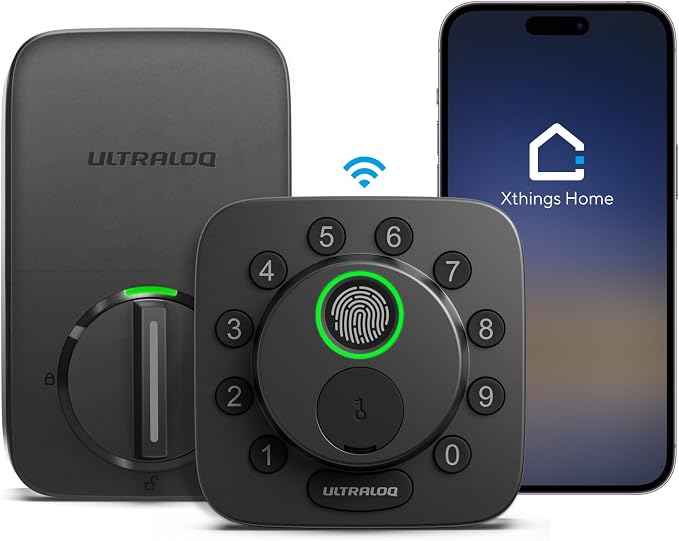
ULTRALOQ Bolt SE (Matter)
For: fingerprint entry, and homes using Apple Home
- EntryFingerprint, code, app, key
- StandardMatter over Thread, plus Wi-Fi
- FingerprintsUp to 50
It opens with a fingerprint, a code, your phone or a key. It has Wi-Fi for remote control in Ultraloq's app.
It also supports Matter (see How the lock connects), so it works with Apple Home, Google Home and Alexa. Matter needs a Thread border router, such as an Apple TV or HomePod mini.
What we like
- Fingerprint reader
- Works with Apple Home through Matter
- Matter and Wi-Fi in one lock
Watch out for
- Matter needs a Thread border router
- Door sensor sold separately

August Smart Lock Pro + Connect
For: keeping your existing lock, keys and outside look
- FitsInside of your current deadbolt
- ExtraAuto-lock and auto-unlock
- BridgeConnect Wi-Fi bridge included
August fits over the inside half of your current deadbolt, so the outside of your door and your keys don't change. It can lock itself after the door shuts and unlock as you walk up. The included Connect bridge links it to Wi-Fi.
August says to measure your door's backset, the hole and the door's thickness before you buy.
What we like
- Keeps your keys and outside hardware
- Auto-lock and auto-unlock
- Good for renters
Watch out for
- No keypad unless bought separately
- Short product listing; check August's site for details

Schlage Electronic Keypad Deadbolt
For: keyless entry without Wi-Fi, apps or accounts
- TypeKeypad deadbolt (not connected)
- RatingBHMA Grade 2
- InstallScrewdriver only
Not a smart lock: you get a lit keypad so nobody needs a key, with no app, no Wi-Fi and nothing to hack. It carries a BHMA Grade 2 rating (see the FAQ) and installs with a screwdriver.
What we like
- Nothing to connect or update
- Metal build
- Easy to install
Watch out for
- No remote access or history
- Set codes on the lock itself

TEEHO TE001 Keypad Deadbolt
For: a back door, shed or a rental you own
- TypeKeypad deadbolt (not connected)
- Codes20 + one-time code
- Fits2-1/8 in. (54 mm) door holes only
A keypad deadbolt with 20 user codes, a one-time code for a visitor, optional auto-lock and a low-battery light. Like the Schlage keypad, it has no app or Wi-Fi.
It fits only standard 2-1/8 in. (54 mm) door holes, so measure yours first.
What we like
- One-time guest codes
- Auto-lock option
- Battery rated up to a year
Watch out for
- Fits only 2-1/8 in. door holes
- No remote access
Retrofit or full replacement?
- Retrofit locks replace only the inside part of your deadbolt. The outside and your keys stay the same.
- Keypad and fingerprint deadbolts replace the whole lock. Anyone with a code or a saved fingerprint can get in without a phone.
- Check the fit. Measure the door’s thickness, the backset (from the door’s edge to the center of the hole) and the size of the hole. Check that the bolt turns smoothly by hand with the door shut; makers warn that a sticking bolt strains the motor.
How the lock connects
- Bluetooth locks talk to your phone when you’re close. Locking from work usually needs an extra Wi-Fi bridge.
- Wi-Fi locks connect straight to your home Wi-Fi, so you can lock up from anywhere. Their batteries run down sooner.
- Z-Wave and Zigbee locks use low-power smart home radios. They need a hub, a small box that links them to your network; see smart home hubs.
- Matter locks follow Matter, a shared standard that works with Apple Home, Google Home and Alexa. Many connect over Thread, a low-power radio. Thread needs a “border router,” a device that links Thread gear to your home network, such as an Apple TV, a HomePod mini or a recent Nest or Echo speaker.
Codes, guests and backups
Give each person their own code. Set temporary codes for guests or cleaners that you can switch off later. Auto-lock closes the bolt a set time after you leave, and an activity log shows who came and went. Most locks run on AA batteries for months and warn you when they get low. Check the backup before you buy. A physical key, or a spot to power the lock from outside, means a flat battery won’t lock you out. A video doorbell lets you see who is there before you open the door.
How we rate
We score every pick out of 10 on four things, weighted for how a gadget earns its place in daily life: how well it does its core job (40%), meaning a watch's tracking and battery life, a camera's video and alerts, a vacuum's suction and navigation, measured against the maker's specifications rather than the marketing; reliability and support (25%), including app quality, firmware updates, ecosystem compatibility (Apple, Android, Alexa, Google Home, Matter) and what owners report after months of use; ease of setup and everyday use (20%); and value, counting any subscription (15%). For gear with no app, like dumbbells or bands, build quality and safety take the place of app and update support.
We have not tested these products ourselves. We read the manufacturer's specifications, compatibility lists and support pages and look for the patterns in verified owners' reviews, both the praise and the recurring complaints. No brand pays for placement, and a commission cannot buy a higher rating. When a pick changes, we will say so on this page.
Frequently asked questions
Can a smart lock be hacked?
Security agencies say the most common risk is a weak account password. Use a strong, unique password and two-step sign-in in the lock’s app, and install updates when it offers them.
What does a BHMA grade mean?
It’s a security and durability rating from the Builders Hardware Manufacturers Association. Grade 1 is the toughest. Grade 2 is a solid level for a home front door.
What if I lose my phone?
You can still use a code, a fingerprint or the key. Sign in to the lock’s app on a new phone to remove the lost phone’s access.
Sources
- BHMA certified products directory (Builders Hardware Manufacturers Association)
- Matter, the shared smart home standard (Connectivity Standards Alliance)
- Secure our world: strong passwords and two-step sign-in (CISA)


